FAQ - Frequently Asked Questions
Getting started using the cheat
How to buy a subscription and get started
- Purchase the key here.
- Register or log in.
- Go to MY ACCOUNT
- Insert your key in the [Key:] field and press the [ACTIVATE KEY] button on the site
- Click the [DOWNLOAD] button to get the loader. If you're having trouble loading the loader, see the troubleshooting article.
- Run the loader and sign in, make sure you selected the correct game. If you're having trouble running the loader, see the troubleshooting article.
- Press the [INJECT] button. Steam will (re)start.
- Start the game manually or press the [START THE GAME] button.
- Product logo should appear in game.
Where do I find configs (cheat settings), LUAs (scripts, for extra features etc) and how do I use them?
Configs by users — *click me*
Config path: %appdata%/INTERIUM/CS2/configs
LUA path: %appdata%/INTERIUM/CS2/scripts
Load CFG and LUA in the last tab of the cheat
Tutorial: *click me*
How do I open the cheat menu?
The default menu button is [INSERT]. If you are using a laptop or don't have an [INSERT] button, press [FN] + [DELETE] or [SHIFT] + [0].
If nothing helps - check if there is a cheat logo in the game, try using the on-screen keyboard (go to Start , then select Settings > Ease of Access > Keyboard, and turn on the toggle under Use the On-Screen Keyboard).
You can change the button in Other > Other tab
Useful links
— Website: https://interium.ooo
— VK group: https://vk.com/interiumcheats
— Feature guide (old): https://docs.google.com/document/d/1ddWfBmDiKFW82o0TDX1gsk8VSH-HtZJERhka_GpCyrc/edit
— Microsoft Visual C++ libraries: https://learn.microsoft.com/cpp/windows/latest-supported-vc-redist
— DirectX library: https://www.microsoft.com/download/details.aspx?id=35
Basic questions
Can I use your product on FACEIT / ESEA / GAMERS GLUB / FASTCUP?
NO
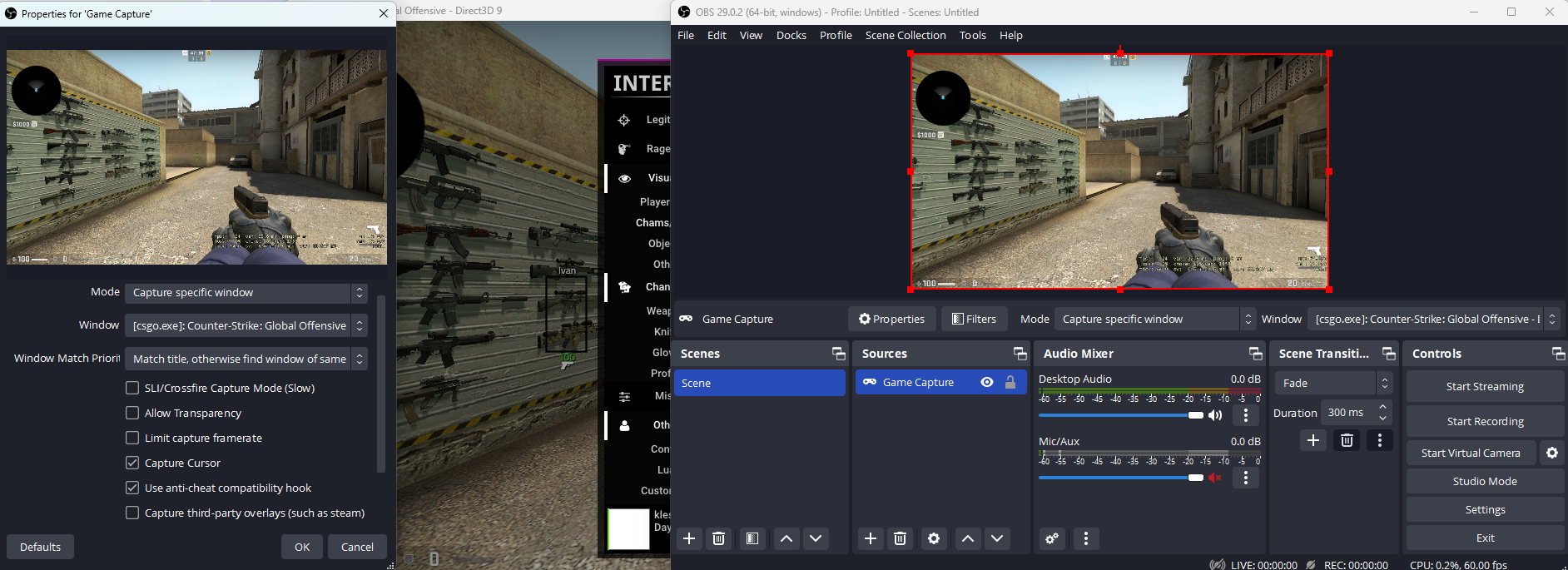
How to use OBS bypass? How to stream with the cheat?
Temporarily not implemented.
CS:GO Blocks OBS. Start the game, turn on the cheat and activate [OBS without "third_party_software"] (be sure to enable this function at the beginning before starting OBS, if you do the opposite, you will have to restart the CS and do everything over again). Run OBS as ADMIN. Don't record the window, record the game. Don't capture third party overlays. If it doesn't work, add -allow_third_party_software to your CS:GO launch options. Turn on OBS Bypass, turn off CHAMS and GLOW.
How to turn off the inscription INTERIUM on the top left (hide the watermark logo)?
Temporarily not implemented.
How to quickly and easily configure aimbot?
The last tab has Autolegit. One slider. Playing with it is very easy to set up an aimbot. Just move more or less and click Apply for all weapons, then see the result.
How to enable crosshair for AWP?
MISC > SPOOFS > ENGINE CROSSHAIR
How to enable bomb info?
VISUALS > OBJECTS > C4
How to do RNG noscopes?
Only Backtrack affects the chance to hit. Set it to max. Smooth for awp can be at a minimum. RNG configs/exploits do not exist.
How to hide cheat when admin is checking your PC?
Press Unhook in the cheat. Open game directory and remove file imgui.ini if it exists. Delete the %appdata%/INTERIUM folder and the loader. Sign out of your account on the site. Clear your browser history. Open the program LastActivityView, search (Ctrl+F) for the word interium, double click on each entry, see Data source. If the first four characters contain HKEY: open Regedit (press Win + R, type regedit), follow the path specified in the Data Source and delete the entry.
How to completely remove the cheat?
Delete the loader you downloaded. Delete the %appdata%/INTERIUM/ folder. To remove all traces, see spoiler above.
How to configure aimbot? Legitbot documentation
For Aimbot to work, you need to enable Enable Legitbot in the global settings and for a specific weapon, Enable Aimbot
=== Checks to disable and enable Legit ====
- Smoke Check - check for smoke. The aiming does not work, there is smoke between you and the enemy.
- Flash Check - check for the effect of a stun grenade on you. Refinement does not work if you are under this effect.
- Jump Check Me - check to see if you are on the ground. Fine-tuning does not work if you are in the air.
- Jump Check Enemy - check for an enemy on the ground. Fine-tuning does not work if the enemy is in the air.
- Auto Wall - aiming works through the wall, but depends on the damage that can be inflicted through the wall, it can also be configured in Min Damage (minimum damage).
- Only is Scope - On sniper rifles, aiming does not work if you are not in aiming mode.
=== Additional options in Legitbot ===
- Auto Crouch - automatic crouch if the enemy is within the finishing radius and shooting is in progress
- On Key - aiming works only when the selected key is pressed (when turned off, aiming works all the time)
- Auto Fire - automatic finishing with a shot, if the enemy got into the aimbot zone, while holding the selected key
- Backtrack - the ability to kill the enemy in the range up to 0.2 seconds when he was in the past (you can say that the model stretches when walking, and if you hit the place where the enemy model was in the past, then the damage is counted).
- Draw Backtrack / Draw Fov - show backtrack range / show aimbot fov.
- Auto Strafe - when running, you don't have to stop so that there is no scatter, the cheat itself will make a micro-strafe, which allows you to shoot accurately at the target on the run (only works on the 1st bullet in the queue, ideal for shooting with a deagle, taping, etc. .d.).
- Auto Pistol - turns a non-automatic pistol into an automatic one.
- Fast Zoom - automatic entry into the sight with a specified delay before firing for sniper rifles.
- Fast Switch - automatic switching from the main weapon to another, and back to quickly exit the scope after a shot from a sniper rifle.
=== Aimbot ===
> Based Fov :
- Center - finishing radius is always static in the center
- Recoil Fov - the recoil radius is dynamically located where the bullets fly
> Fov Type :
- Static - finishing radius is static on the screen of the same size
- Dynamic - the radius of refinement relative to the players and their distance is different, the closer the enemy, the more fov
> Smooth Type
- Static - finishing speed is always static, with one speed
- Deceleration - deceleration speed slows down the closer the crosshair is to the enemy
- Acceleration - the speed of finishing is accelerated, the closer the sight is to the enemy
> Aim Type
- Aim - the usual fine-tuning of the sight to the enemy
- PSilent - fine-tuning bullets to the enemy (works only on the 1st bullet, then comes the usual fine-tuning)
- Aim + PSilent - normal aiming brings to PSilent's fov, after which a shot occurs and brings the bullet to the enemy (works only on the 1st bullet, then normal aiming follows)
- Fov - finishing radius for normal finishing
- Fov PSilent - finishing radius for finishing bullets
- Smooth - smoothing speed for normal smoothing (the higher the speed, the slower the smoothing)
- RCS Setting - includes additional settings for finishing radius and finishing speed after the 1st bullet
- Fov RCS - finishing radius after the 1st bullet
- Smooth RCS - finishing speed after the 1st bullet for normal finishing (the higher the speed, the slower the finishing)
> RCS Type
- None - disable recoil suppression
- Standalone - enable recoil suppression always, even if there is no aiming
- On Aim - enable recoil suppression only when aiming at an enemy
- RCS Y - recoil suppression power along the Y axis (it is not recommended to set more than 100%, the sight will take you down a lot, this can only be useful for pistols, since 100% may not be enough there)
- RCS X - recoil suppression power along the X axis (it is not recommended to set more than 100%, the sight will move down a lot, this can only be useful for pistols, since 100% may not be enough there)
> Delay on
- None - turn off any delays before firing
- Shot - enable a customizable delay for a shot, during which the refinement continues to work
- Aim - enable a customizable delay for fine-tuning, during which the weapon continues to shoot (this type of delay is only for automatic weapons)
~ When Delay on [Shot] is selected
> Shot Delay Type
- Time - enable customizable static delay for timed shot
- Auto - enable automatic delay for the shot (the shot will be fired as soon as the sight is on the enemy's bones)
~ When Delay on [Shot] and Shot Delay Type [Time] are selected
- Shot Delay - adjustable delay time for a shot
~ When Delay on [Aim] is selected
- Reaction Time - customizable delay time for finishing
> Kill Delay Type
- None - turn off the delay in the operation of the aimbot, after killing, when clamping
- Time - enable a configurable delay in the operation of the aimbot, after killing, when clamping by time
- One Kill - turn off the aimbot after the 1st kill while holding down
(if you stop shooting and start again, then any delays after the kill subside)
~ When Kill Delay Type [Time] is selected
- Kill Delay Time - configurable delay time for the aimbot, after killing, when holding
> Hitboxes - selection of the main parts of the body to which the aimbot will be brought (you can select all parts at once, it will be like Nearest, but with selected bones for it)
> Added Hitboxes - selection of additional parts of the body to which the aimbot will be brought in case it cannot reach the main parts of the body
> Enemy priority
- Fov - priority of finishing to the enemy, which is closest to the sight
- Health - priority of finishing to the enemy with less health
- Damage - the priority of finishing to the enemy, which will deal more damage
- Distance - the priority of finishing to the enemy, which is closer to you (in the game)
Troubleshooting
Antivirus says it is a virus!1!!0!!!!
Download the loader only from MY ACCOUNT. If your antivirus blocks it, contact support.
Can not download the loader
— Change save path.
— If file can not be saved, click on download button with right mouse button > Save object as, then save as different name.
— Contact support.
This app can’t run on your PC
Redownload the loader from your account.
After starting the loader, it shows an error "not supported on your device"
— Redownload the loader from your account.
— If file can not be saved, click on download button with right mouse button > Save object as, then save as different name.
File deletes itself
Redownload the loader from your account. If the file disappears again, contact support.
The loader doesn't start. Nothing happens at startup
— Turn off virtual machine, Windows secure mode, Windows test mode.
— Delete all debuggers, monitors, analyzers and similar programs.
— Reboot your PC.
— Download 7zip or WinRar, add loader to archive (Right mouse button click on file > Add to archive > OK). Start file from archive.
After starting the loader, it shows Windows error "MSVCP140.dll" or any other
- Visual C++
- DirectX
- Reboot your compunter after installing this components.
The loader stucks on "CONNECTING" or Can not connect to site
— Try VPN.
— Contact support.
VAC Error
Validate game files using steam.
After pressing [INJECT], it says "Wait" forever
— Reboot your device. Turn off your router for 5 minutes.
— Redownload the loader if it was downloaded long time ago.
— Try using a VPN to inject the cheat.
— Servers may be temporarily down. Try again later.
— Contact support.
After injecting the cheat, nothing happens in the game
— Try the checkboxes in the loader.
— Verify the game files and delete the %appdata%/INTERIUM folder.
— Remove ALL game launch option (startup parametrs). To do this, open Steam, Right mouse button click on the game in steam library > Properties, empty the launch button field.
— Reboot your PC
— Delete Debuggers, Analyzers, and such programs (Process Hacker, Wireshark and etc)
— Turn off virtual machine, Windows secure mode, Windows test mode
— Download and install this components:
- Visual C++
- DirectX
- Reboot your compunter after installing this components.
— Delete the file C:\Log.txt, inject again and tell if the file appeared.
— Reinstall loader.
— Try setting the game settings (before injection) to minimum.
— Reinstall cs and steam from a clean account before manually deleting the remnants of the game and sim in the folders.
— Try to run, try adding -novid to the game's launch options.
— Try a VPN.
— Load the system restore point.
— Wait 6 minutes without closing the csgo after the expiration.
How to inject: *click me*
After injecting the cheat, CS:GO crashes
— Switch game shader settings before injection.
— Verify the game files and delete the %appdata%/INTERIUM folder.
— Remove ALL game launch option (startup parametrs). To do this, open Steam, Right mouse button click on the game in steam library > Properties, empty the launch button field.
— Reboot your PC
— Delete all Anti-Cheats (FACEIT and etc)
— Delete Debuggers, Analyzers, and such programs (Process Hacker, Wireshark and etc)
— Turn off virtual machine, Windows secure mode, Windows test mode
— Download and install this components:
- Visual C++
- DirectX
- Reboot your compunter after installing this components.
— Delete the file C:\Log.txt, inject again and tell support if the file appeared or not.
— Try the checkboxes in the loader.
— Try setting the game settings (before injection) to minimum.
— Reinstall cs and steam from a clean account before manually deleting the remnants of the game and sim in the folders.
— Try to run, try adding -novid to the game's launch options.
— Try a VPN.
— Load the system restore point.
— Wait 6 minutes without closing the csgo after the expiration.
How to inject: *click me*
After loading into a map with the cheat, game crashes
— Remove ALL game launch option (startup parametrs). To do this, open Steam, Right mouse button click on the game in steam library > Properties, empty the launch button field.
— Most likely the cheat has not been updated for the latest version of the game. We will fix the problem as soon as possible.